



Leawo PowerPoint to Video
Leawo PowerPoint to Video is a great PowerPoint presentation tool that can convert PowerPoint to video and audio file in almost any formats. This PowerPoint to video converter is the only and the best tool in the world, as it can retain all the original elements of animation, sounds, movie clips, transitions, and internal links for PowerPoint to video conversion; it also allows to insert any quantity of background music to the outputs. It is these powerful functions that make this PowerPoint to video converter become the best choice for lecturers, teachers, and people who want to share the PowerPoint Presentation on video sharing sites like YouTube, PC, Portable devices like iPod, iPhone, Zune, PSP, Apple TV, Blackberry, Creative Zen Player, PS3, Xbox, and more MP4, MP3 players.As PowerPoint to Video Converter, it can convert PowerPoint to AVI, 3GP, 3G2, MP4, WMV, MOV, FLV, VOB, MPG, MPEG1, MPEG2, DV, etc.
As PowerPoint to Audio Converter, it can convert PowerPoint to MP3, AAC, M4A, WAV, WMA, AC3, MP2, etc.

 XP/Vista/Win 7/Win 8/Win8
Key Features
- User-friendly and easy-to-use interface.
- Suport PowerPoint 2000/2003/2007/2010/2013.
- Support Free PowerPoint Viewer 2007/2010.
- Support 32-bit & 64-bit PowerPoint.
- Convert PowerPoint to video in all formats.
- Convert PowerPoint to AVI, FLV, MP4, 3GP, MOV, etc.
- Convert PowerPoint to DVD compatible AVI, MPEG, and VOB file.
- Convert PowerPoint to MP3, AAC, AC3, M4A, audio file.
- Customize every single PowerPoint file when batch conversion.
- Insert background music to output files.
- Add image as watermark to protect your PowerPoint file.
- Flexible output settings for different screen sizes.
- Perfect synchronization of sound and animation.
- Real-time preview output video during conversion.
- Retain the original music, animation, movie clips, slide transitions, and internal links for conversion.
- Support batch process and convert multiple PowerPoint to video at a time.
- No limitation on the PowerPoint files for conversion.
- Fast PowerPoint to video conversion speed and clear output files.
What can Leawo PowerPoint to Video do for you?
- Share PowerPoint Presentation on YouTube. (Lecturers & Teachers)
- Enjoy PowerPoint on Portable devices. (Anyone)
- Share Presentations on DVD/TV player with families. (Anyone)
- Review PowerPoint lessons on MP4 players. (Students)
- Upload PowerPoint lectures to blog, padcast for share. (Lecturers & Teachers)
- Share family party photos on video sharing sites. (Anyone)
How to use Leawo PowerPoint to Video?
Before using this program, please download and install Leawo PowerPoint to Video.
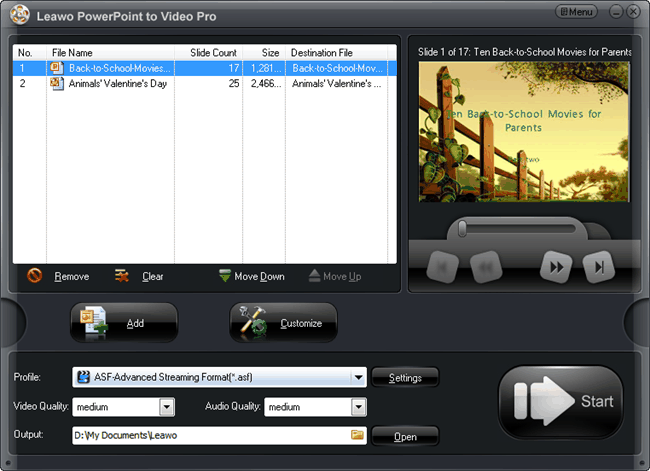
Step 1: Add PowerPoint file. Click “Add” to import PowerPoint file to the program. Multiple PowerPoint files are supported to be imported and converted at a time.
Step 2: Customize file. Select a PowerPoint file in the file list, click “Customize” to customize file for output.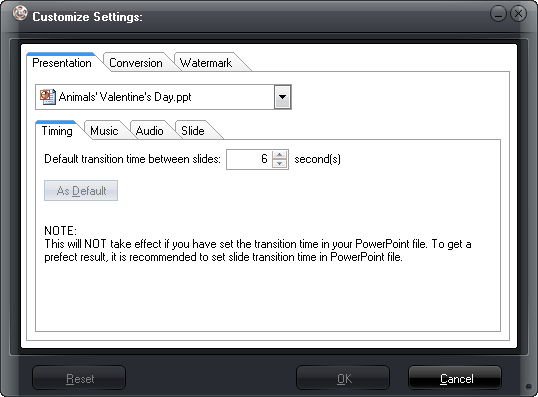
(1) Timing: Set default transition time between slides. It is recommended to set slide transition time in PowerPoint file.
(2) Music: You can insert any quantity of music as the background music.
(3) Audio: Tick the checkbox to ignore audio file in the original PowerPoint file.
(4) Slide: Tick the checkbox to keep the slides aspect ratio. The checkbox is ticked by default.
(5) Conversion: Tick the checkbox to mute in conversion process and make output vertical flip. Besides, you can select options from “Rename” or “Override” when the same name output file exits.
(6) Watermark: Upload images from your computer as watermark to protect your copyright or for advertisement. Besides, you can customize the output video layout to make your output video better.
After customization, click “OK”.
Step 3: Output Detail Settings. Select output file format and profile by clicking drop-down button directly next to the corresponding place (AVI, MP4, FLV… in high, medium, or low quality).
Or, click “Settings” to make detail settings for getting better output quality.
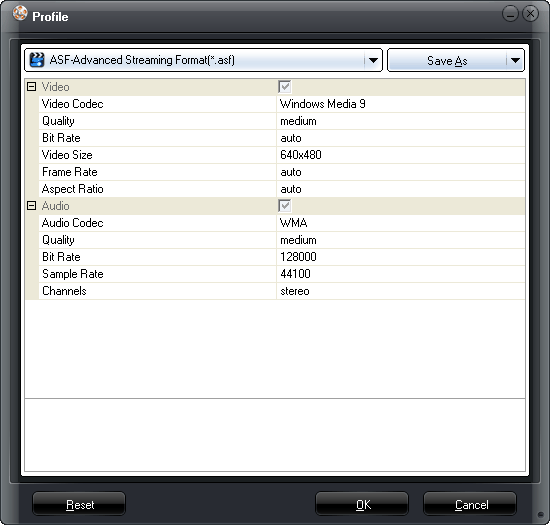
From the “Profile” window, you can check output profile, output detail settings, such as video amd audio codec, bit rate, video size, frame rate, aspect ratio, sample rate, etc. You can specify the value for your specific needs. Then click “OK”.
Step 4: Convert. After completed all settings, just click “Start” to start PowerPoint to video conversion process. You can check the "Preview" box so that you can preview the output video real-time while the PowerPoint is still converting.
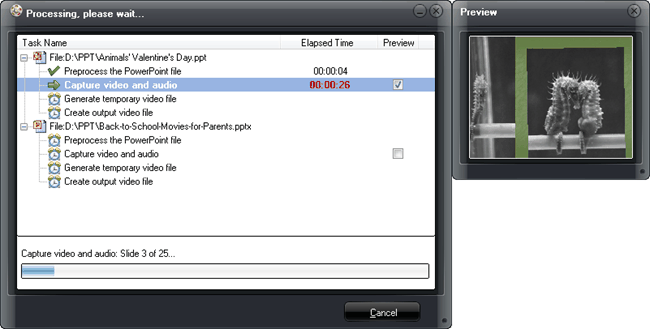
Then you just need to go out for a walk or have a cup of coffee. When you come back, the conversion must have completed, the thing left for you is just upload the output file to video sharing sites like YouTube, blog, or transfer to your iPhone, iPod Portable players.

 Products List
- Video Tools
- Total Media Converter Ultimate
- Video Converter Ultimate/Pro

- Video Converter
- Blu-ray Creator
- DVD Creator
- iTransfer
- Music Recorder

- Video Accelerator
- PowerPoint Tools
- PowerPoint to DVD Pro
- PowerPoint to DVD Standard
- PowerPoint to Video Pro
- PowerPoint to FLV
- PowerPoint to YouTube
- PowerPoint to iPad
- Blu-ray/DVD Tools
- Blu-ray Video Converter
- Blu-ray Copy
- Blu-ray Ripper
- Blu-ray Player
- Blu-ray to MKV Converter
- DVD Ripper
- DVD Copy
- Utilities
- iOS Data Recovery
- iOS Data Recovery for Mac
- Tunes Cleaner
- Tunes Cleaner for Mac
- SWF Encrypt
- SWF Encrypt for Mac
- Mac Video Tools
- Video Converter Pro for Mac
- Video Converter for Mac
- Blu-ray Creator for Mac
- DVD Creator for Mac
- iTransfer for Mac
- Music Recorder for Mac
- YouTube Downloader for Mac
- iAm Ringer for Mac
- Mac Blu-ray/DVD Tools
- Blu-ray Ripper for Mac
- Blu-ray Copy for Mac
- Blu-ray Player for Mac
- Blu-ray to MKV Converter for Mac
- DVD Ripper for Mac
- DVD Copy for Mac
with the good work.
From Jay Burt
I was lucky that my search words matched your website offering. I may recommend to
my friends about you.
From Rajesh Madhawarayan