Last updated on 2025-10-31, by
How to View Twitter Without an Account?
Summary:
- Usually, you will be asked to log into your Twitter account if you want to view Tweets, but here in this article, you will get 4 tips to view Twitter contents freely without an account.
While previously known as Twitter, now it is changed to be X, one of the most popular social media platforms to let you stay connected with the world. There are always times you want to check the latest news or trending topics, view a specific profile, or anything else on Twitter. However, you will be asked to log into your Twitter account. Many people have been searching for answers for questions like “can you view X without an account”, since they might not be willing to create another social media account. If you are one of them, you will get answered well in this post. Here we would like to walk you through on how to view Twitter without an account in 4 ways.
OutlineCLOSE
Limitations of Viewing Twitter Without an Account
Every time you enter a social media platform, you might be asked to log in with your own account, or create an account if you are still not their user. Social media platforms try to get more users by adopting various limitations, so is Twitter/X. There are significant limitations for you to view X without account, in various ways like commenting, replying, following, searching, etc.
The below content will show you what are the limitations in detail.
Limitations:
- Interaction limitation: You can’t interact with others in any way if you are not logged in, such as liking, commenting, reposting, replying, following, etc.
- Content limitation: You will not get access to majority posts of others (even public contents), profile checking, age-restricted contents, NSFW contents, etc.
- Login prompt: You will be frequently asked to log into Twitter or X for content viewing or other interactions.
- Search limitation: You won’t be able to search within Twitter/X. The built-in search bar is not accessible.
- X Spaces limitation: Access to the X Spaces (live audio conversation) is denied to unregistered or unlogged users.
- No viewing statistics: Twitter/X will not be able to collect the viewing statistics of specific post if it is viewed without login.
By applying these limitations, X/Twitter tries its best to let you sign up or log into Twitter/X, making sure you are one of their users. The most annoying limitation should be the login prompt. It just prompts out every time you click a post or make an interaction.
How to View Twitter Without Account?
Despite these limitations applied to unregistered Twitter/X users, can you view X without an account? Of course, yes. There are still quite a few ways for you to view Twitter without account, without even being annoyed by these limitations.
1. Direct URL Access
If someone has sent you a public post or profile link of a Twitter user via email or chat, you could directly click and open the Twitter URL to view Twitter without account. Twitter doesn’t limit such access to its content and profile. To view Twitter without account via direct Twitter post or profile URL, you need to:
- Step 1: Copy and paste the Twitter post or profile URL into your browser.
- Step 2: Press the Enter key on your keyboard.
- Step 3: You could then browse and view Twitter without account until you come across the Twitter login prompt.
2. Twitter Web Viewer

Besides, there are quite a lot of Twitter viewers to let you view Twitter without account. twitter-viewer.com is one of the most popular Twitter viewers to let you view X without account, as long as you get the username of a Twitter/X user. It is easy to use twitter-viewer.com for Twitter search without account.
- Step 1: Open twitter-viewer.com website on your browser.
- Step 2: Copy and paste the @username of the profile you want to view.
- Step 3: Then click the “View Profile” button.
Now, you could view all posts of the target Twitter user in one page.
3. Search Engine Tricks

Also, you could make use of the search engine tricks to browse and search for the Twitter profile and their posts. The search engines will display all available posts of the target Twitter profile for you to view without account. The below steps would show you how to view Twitter without account via Google search engine tricks.
- Step 1: Open google.com website on your browser.
- Step 2: Enter “site:x.com profile_user_name” to view all posts indexed in the same Twitter profile, or “site:x.com a specific event” to view all posts indexed related to the target event.
- Step 3: Then you could view all related posts directly on Google search engine results.
This method has its limitation: if a post on Twitter is not indexed, it won’t appear on the results. Therefore, you won’t be able to view them.
4. Social Media Aggregators/RSS
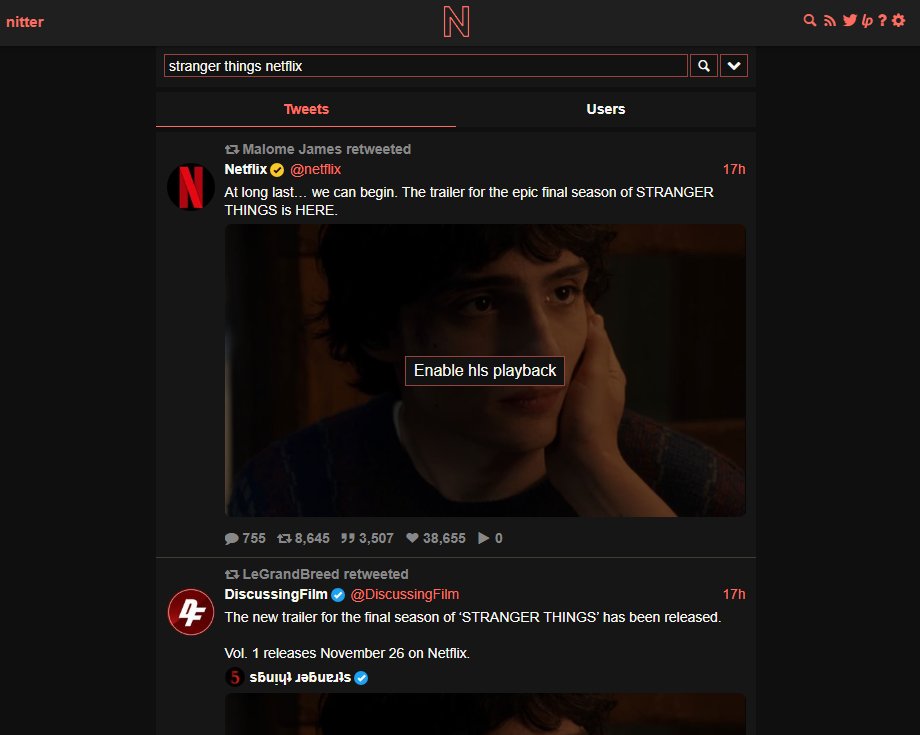
You could also make use of social media aggregators to view Twitter without account. One of the popular social media aggregators is Nitter, which lets you view Twitter contents without an account and login. You could try to view Twitter contents via Nitter or other social media aggregators. Nitter works as following:
- Step 1: Open Nitter.net website.
- Step 2: Enter the Twitter username or a hashtag you want to view on Twitter.
- Step 3: Then press the search button.
- Step 4: Nitter.net will then list all available tweets, media and replies for you to view.
Pro Tip: Download Twitter Videos Without an Account
Some of the above solutions even enable you to bookmark a Twitter post for future viewing. Also, you could actually download Twitter videos or images to your local drive for offline viewing without any limit. By downloading Twitter videos to local drive, you then won’t need to make use of any Twitter viewer tools to view digital media files.
There are quite a few tools for you to download Twitter videos once you get the Twitter post URLs. You could make use of desktop or online Twitter video downloaders, or even Twitter video recording tools. CleverGet Video Downloader is a professional and recommended Twitter video downloader that could help you download Twitter videos at FHD quality in simple clicks.

-
Professional video downloader to download on-demand videos and live streaming videos from 1000+ streaming services like YouTube, Facebook, Instagram, TikTok, etc.
- Batch download online video to MP4/MKV files.
- Download up to 8K video and 320kbps audio.
- Detect and remove ads during video download.
FAQs
1. Does Twitter know I’m viewing Tweets without an account?
No, when there is no login, there is no calculating of tweet viewing. When you are not signed in, your tweet viewing activity is anonymous, and Twitter can’t track your activity. That’s why many people would like to view Twitter without account.
2. Is third-party Twitter viewer safe?
Generally speaking, yes, 3rd-party Twitter viewers are safe to use. They will not collect any of your information since there is no sign-in required.
3. Can I watch live Twitter Spaces without login?
Yes, when you receive the live Twitter Spaces via a direct link shared to you without sign-in.
Conclusion
When you don’t want to log into your Twitter account or even have a Twitter account, you could still make use of the solutions mentioned in this article to view Twitter without an account, anonymously. Your viewing activity won’t be tracked by Twitter, and all the solutions mentioned above are safe and easy to try.
-

Complete Guide: Types of Blu-ray Discs and Their UsesCassie J./2026-03-30
-

How to Play Region B Blu-ray in Any Region?Cassie J./2026-02-28
-

How to Play AVI Files on Mac and WindowsCassie J./2026-01-30
-

The Complete Guide to Play Blu-ray on PS5Cassie J./2025-12-23
-

How to Increase the Resolution of Image?Cassie J./2025-11-26
-
How to View Twitter Without an Account?Cassie J./2025-10-31
-
How to Convert AVCHD to MP4 on Mac, Windows, Android, and iPhone?Cassie J./2025-09-28
-

What is Region 1 DVD? How to Play Region 1 DVD in Other Regions?Cassie J./2025-08-21
-

How to Burn YouTube Video to DVD for Offline Archive?Cassie J./2025-07-11
-

Can’t Play Video? 6 Quick Solutions for “Video Codec Not Supported”Cassie J./2025-06-25