


Leawo iPod Converter Pro
Fast convert video to iPod compatible MP4 file! Leawo iPod Converter Pro is a handy utility that can convert all video to MP4 video file for video on iPod player entertainment, such as AVI to iPod, MP4 to iPod, etc.
This video to iPod converter also can rip audio file from the original video file and export as different formats: video to MP3, M4A, WAV, AAC, etc.
To get the best output quality, this iPod converter also allows you getting the original video brightness, contrast and saturation adjusted, video duration shorten, and video black edge cropped, etc.
Inputs: WMV, WMA, AVI, MPG, MPEG, RMVB, RM, RA, MOV, QT, MP4, M4V, DV, DAT, MP3, AAC, etc.
Outputs: iPod MP4 video, iPhone MP4 video, iPad MP4 video, Apple TV MP4 video, MP3, M4A, WAV, AAC, etc.
 XP/Vista/Win 7/Win 8
Key Features
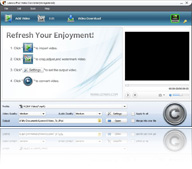 Convert video to MP4 file.
- Enjoy video on Portable players: video on iPod, iPhone, Apple TV, etc.
- Convert video to audio: MP3, AAC, M4A, WAV.
- Adjust output effects: video brightness, contrast & saturation , audio volume, etc.
- Trim video duration to get the exact video clip that interests you.
- Crop and letterbox is to get rid of the margins.
- Make the original video quality better.
- Merge all added video and convert into a large iPod MP4 file.
- Nice interface and clear instructions.
- Easy-to-use, no professional knowledge is required.
- Support huge files in size.
- Conversion requires no human involvement.
Related Products:
-
iTransfer
- Practical assistant to iTunes with comprehensive ability to freely transfer data between iDevices, iTunes and PC. Learn More

-
Blu-ray Copy
- Copy Blu-ray movie to a new Blu-ray disc, Blu-ray folder or ISO image in 1:1 size.
Learn more
-
Total Media Converter
- All-in-one media solution to convert between Blu-ray/DVDs and videos at will.
Learn More
How to use Leawo iPod Converter Pro?
Step1. Add video files. Click " " to import your videos.
Step2. Edit. Customize effect, trim, crop and watermark video.
Step 3: Settings. Set output file format and folder.
Step 3: Start conversion. Convert video to iPod MP4 video file.

 Products List
- Video Tools
- Total Media Converter Ultimate
- Video Converter Ultimate/Pro

- Video Converter
- Blu-ray Creator
- DVD Creator
- iTransfer
- Music Recorder

- Video Accelerator
- PowerPoint Tools
- PowerPoint to DVD Pro
- PowerPoint to DVD Standard
- PowerPoint to Video Pro
- PowerPoint to FLV
- PowerPoint to YouTube
- PowerPoint to iPad
- Blu-ray/DVD Tools
- Blu-ray Video Converter
- Blu-ray Copy
- Blu-ray Ripper
- Blu-ray Player
- Blu-ray to MKV Converter
- DVD Ripper
- DVD Copy
- Utilities
- iOS Data Recovery
- iOS Data Recovery for Mac
- Tunes Cleaner
- Tunes Cleaner for Mac
- SWF Encrypt
- SWF Encrypt for Mac
- Mac Video Tools
- Video Converter Pro for Mac
- Video Converter for Mac
- Blu-ray Creator for Mac
- DVD Creator for Mac
- iTransfer for Mac
- Music Recorder for Mac
- YouTube Downloader for Mac
- iAm Ringer for Mac
- Mac Blu-ray/DVD Tools
- Blu-ray Ripper for Mac
- Blu-ray Copy for Mac
- Blu-ray Player for Mac
- Blu-ray to MKV Converter for Mac
- DVD Ripper for Mac
- DVD Copy for Mac
with the good work.
From Jay Burt
I was lucky that my search words matched your website offering. I may recommend to
my friends about you.
From Rajesh Madhawarayan